| Author |
Topic |
|
andrewc
Starting Member
10 Posts |
 Posted - 2008-06-09 : 08:06:53 Posted - 2008-06-09 : 08:06:53
|
| Hi all, I was wondering if you's could help me out.We run sql optimization on 2 of our databases and when they run they cause our server to crash - system log reports: unexpected shutdown. When we take these jobs out of action the server does not crash.I'm not sure if this could be a CPU or memory related issue or if its a SQL configuration issue?Any comments/ideas would be great.Thanks. |
|
|
SwePeso
Patron Saint of Lost Yaks
30421 Posts |
Posted - 2008-06-09 : 08:13:15
|
What is "SQL optimization"?
E 12°55'05.25"N 56°04'39.16" |
 |
|
|
andrewc
Starting Member
10 Posts |
Posted - 2008-06-09 : 08:15:21
|
| When you do a database Maintenance Plan you can select Optimization for that specific database. |
|
|
|
SwePeso
Patron Saint of Lost Yaks
30421 Posts |
Posted - 2008-06-09 : 08:19:43
|
Index optimization?Do you have enough disk space?
E 12°55'05.25"N 56°04'39.16" |
|
|
|
andrewc
Starting Member
10 Posts |
Posted - 2008-06-09 : 08:41:09
|
| Yeah, most likely Index Optimization.Yeah, loads of disk space. |
|
|
|
andrewc
Starting Member
10 Posts |
Posted - 2008-06-09 : 08:49:14
|
This may shed some light...Its the optimizations tab of this windows: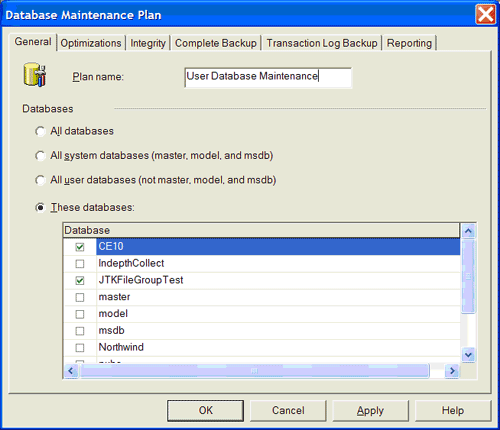 Thanks Thanks |
|
|
|
SwePeso
Patron Saint of Lost Yaks
30421 Posts |
Posted - 2008-06-09 : 09:07:32
|
I think I need glasses, because I see General tab, not Optimization tab.
E 12°55'05.25"N 56°04'39.16" |
|
|
|
andrewc
Starting Member
10 Posts |
Posted - 2008-06-09 : 09:32:36
|
| Sorry thats the only web image I can find. Its the optimizations tab of that window. |
|
|
|
mdubey
Posting Yak Master
133 Posts |
|
|
SwePeso
Patron Saint of Lost Yaks
30421 Posts |
Posted - 2008-06-09 : 09:42:13
|
Is it this tab? If so, you will definitely need more disk space. If so, you will definitely need more disk space.
E 12°55'05.25"N 56°04'39.16" |
|
|
|
andrewc
Starting Member
10 Posts |
Posted - 2008-06-09 : 09:59:30
|
| Thats the correct tab, there is at least 60gig left on each disk that is in the server. |
|
|
|
SwePeso
Patron Saint of Lost Yaks
30421 Posts |
Posted - 2008-06-09 : 10:02:17
|
Doesn't say much.How big is your database now?
E 12°55'05.25"N 56°04'39.16" |
|
|
|
andrewc
Starting Member
10 Posts |
Posted - 2008-06-09 : 10:06:31
|
| Its 5601.69MB. |
|
|
|
andrewc
Starting Member
10 Posts |
Posted - 2008-06-09 : 11:18:18
|
| Any other idea's? |
|
|
|
tripodal
Constraint Violating Yak Guru
259 Posts |
Posted - 2008-06-09 : 12:20:32
|
| Is your hardware overheating?Failed / Failing harddrive? (bad sectors in your freespace will do such things) |
|
|
|
sodeep
Master Smack Fu Yak Hacker
7174 Posts |
Posted - 2008-06-09 : 16:41:51
|
| Because you are Rebuilding index for all databases which is offline operation. And also you are shrinking database. It should be done in offline hours. |
|
|
|
rmiao
Master Smack Fu Yak Hacker
7266 Posts |
Posted - 2008-06-09 : 22:36:47
|
| Did you see any error in plan's log file? |
|
|
|
andrewc
Starting Member
10 Posts |
Posted - 2008-06-10 : 03:46:49
|
| No errors in the log file, it just stops logging at no perticular point.It could be failing hardware, would defragmenting the hard drive fix bad sectors? How could I run a memory check while the server is live?Thanks |
|
|
|
sodeep
Master Smack Fu Yak Hacker
7174 Posts |
|
|
tkizer
Almighty SQL Goddess
38200 Posts |
Posted - 2008-06-10 : 19:39:36
|
| This sounds like a bug. The system should not shutdown before, during, or after any maintenance plans.What does SELECT @@VERSION show?Tara KizerMicrosoft MVP for Windows Server System - SQL Serverhttp://weblogs.sqlteam.com/tarad/Subscribe to my blog |
|
|
|
andrewc
Starting Member
10 Posts |
Posted - 2008-06-17 : 04:28:42
|
| SELECT @@VERSION shows: Microsoft SQL Server 2000 - 8.00.2039 (Intel X86) May 3 2005 23:18:38 Copyright (c) 1988-2003 Microsoft Corporation Standard Edition on Windows NT 5.2 (Build 3790: Service Pack 2) |
|
|
|
Next Page
|



 SQL Optimization Server Crash