Please start any new threads on our new
site at https://forums.sqlteam.com. We've got lots of great SQL Server
experts to answer whatever question you can come up with.
| Author |
Topic |
|
steve4134
Starting Member
24 Posts |
 Posted - 2010-10-19 : 11:58:37 Posted - 2010-10-19 : 11:58:37
|
I hope I give enough information to sufficiently solve my problem. I come from a helpdesk role and am trying to break into a new position. What I am trying to do is convert date information into a number field. My company deals in sales but we do not want to count the Weekends or holidays. Below is what I have come up with. First I found and modified a stored procedure to give me a temp table along with creating a table with the holidays I wanted to filter. I was able to then input that into my stored procedure to give me the desired results below. My goal is to filter all the dates out below and only have non holidays and weekdays show. In my attatched image I only show the month of October with my Columbus day filtered out. I am now looking for a way to filter out Weekend dates as well This is my first post so i apologize in advance if I worded this improperly. Hope to hear from some people.Steve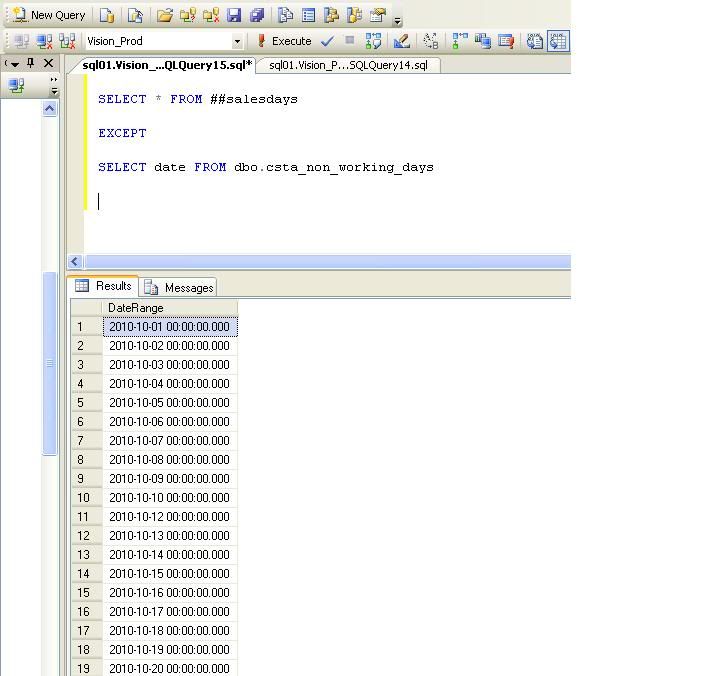 |
|
|
visakh16
Very Important crosS Applying yaK Herder
52326 Posts |
|
|
steve4134
Starting Member
24 Posts |
Posted - 2010-10-19 : 14:27:12
|
| Hey VisakhThank you for your reply.Currently I am using the following stored procedure to create a temp table to come up with my dates used. Following is my code.USE [Vision_Prod]GO/****** Object: StoredProcedure [dbo].[GetDateRange] Script Date: 10/19/2010 14:21:46 ******/SET ANSI_NULLS ONGOSET QUOTED_IDENTIFIER ONGOALTER procedure [dbo].[GetDateRange]@StartDate datetime,@EndDate datetime,@Inclusive bit = 1asset nocount on;declare @DayDiff smallint;set @DayDiff = datediff(dd, @StartDate, @EndDate);if @Inclusive = 0 set @DayDiff = @DayDiff - 1;with cteRange (DateRange)as ( select dateadd(dd, datediff(dd, 0, @EndDate) - @DayDiff, 0) union all select dateadd(dd, 1, DateRange) from cteRange where dateadd(dd, 1, DateRange) < (@EndDate + @Inclusive) )select DateRangeINTO ##salesdaysfrom cteRangeoption (maxrecursion 3660);==================================================I then run the following off the temp table I created to come up with my the data I have shown in the picture above.SELECT * FROM ##salesdaysEXCEPTSELECT date FROM dbo.csta_non_working_days=================================================================================================================================================Is there any way to apply what you have shown me in your blog to my current stored procedure ? Thank you again.Steve |
 |
|
|
visakh16
Very Important crosS Applying yaK Herder
52326 Posts |
Posted - 2010-10-19 : 14:34:55
|
quote:
Originally posted by steve4134
Hey VisakhThank you for your reply.Currently I am using the following stored procedure to create a temp table to come up with my dates used. Following is my code.USE [Vision_Prod]GO/****** Object: StoredProcedure [dbo].[GetDateRange] Script Date: 10/19/2010 14:21:46 ******/SET ANSI_NULLS ONGOSET QUOTED_IDENTIFIER ONGOALTER procedure [dbo].[GetDateRange]@StartDate datetime,@EndDate datetime,@Inclusive bit = 1asset nocount on;declare @DayDiff smallint;set @DayDiff = datediff(dd, @StartDate, @EndDate);if @Inclusive = 0 set @DayDiff = @DayDiff - 1;with cteRange (DateRange,Holiday)as ( select dateadd(dd, datediff(dd, 0, @EndDate) - @DayDiff, 0),CASE WHEN DATENAME(dw,dateadd(dd, datediff(dd, 0, @EndDate) - @DayDiff, 0)) NOT IN ('Saturday','Sunday') THEN 1 ELSE 0 END union all select dateadd(dd, 1, DateRange),CASE WHEN DATENAME(dw,dateadd(dd, 1, DateRange)) NOT IN ('Saturday','Sunday') THEN 1 ELSE 0 END from cteRange where dateadd(dd, 1, DateRange) < (@EndDate + @Inclusive) )select DateRange,HolidayINTO ##salesdaysfrom cteRangeoption (maxrecursion 3660);==================================================I then run the following off the temp table I created to come up with my the data I have shown in the picture above.SELECT DateRange FROM ##salesdaysEXCEPTSELECT date FROM(SELECT date FROM dbo.csta_non_working_daysUNIONSELECT DateRange FROM ##salesdays WHERE Holiday=1)t=================================================================================================================================================Is there any way to apply what you have shown me in your blog to my current stored procedure ? Thank you again.Steve
------------------------------------------------------------------------------------------------------SQL Server MVPhttp://visakhm.blogspot.com/ |
|
|
|
steve4134
Starting Member
24 Posts |
Posted - 2010-10-19 : 16:53:24
|
Hey Visakh Thank you so much. Your prompt replies are greatly appreciated. My last question is the following. I was to retain my original stored procedure but use the following code. I want to incorporate the following statement into my select statement.===========SELECT DATEPART(WEEKDAY, GETDATE())========Please see the picture I have attached. My goal is to create another column with the days of the week numbered 1-7 to the right of the day. I believe this would need to go above my Except statement. Any help would be appreciated.Steve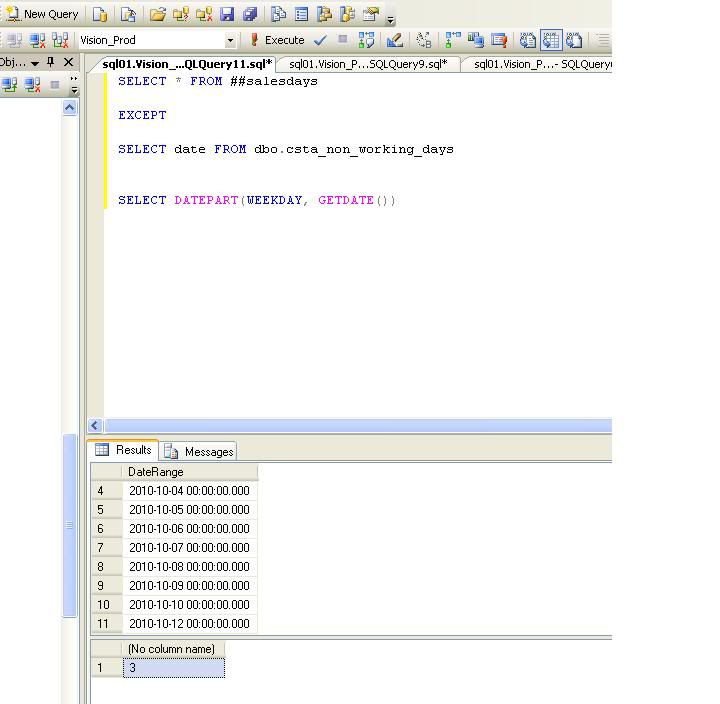 |
|
|
|
visakh16
Very Important crosS Applying yaK Herder
52326 Posts |
Posted - 2010-10-20 : 12:44:21
|
| [code]SELECT DateRange,DATEPART(WeekDay,DateRange) FROM ##salesdaysEXCEPTSELECT date,DATEPART(WeekDay,date) FROM dbo.csta_non_working_days[/code]------------------------------------------------------------------------------------------------------SQL Server MVPhttp://visakhm.blogspot.com/ |
|
|
|
|
|
|
|
|



 Formatting date to filter out weekend