| Author |
Topic |
|
M_Lyons10
Starting Member
11 Posts |
 Posted - 2011-10-11 : 15:54:22 Posted - 2011-10-11 : 15:54:22
|
| Hello everyone. I'm having a really rough time with this so I figured I would ask. I haven't had much input on MSDN Forums.Here's my thread though if you'd like to see it:http://social.msdn.microsoft.com/Forums/en-US/sqldataaccess/thread/16a46463-67d3-4ec6-9c5f-74d73a87201bBasically, I have a SQL Server instance on our server here at the office that we use for another program currently. I would like to connect to it to use it for a new program that we are going to be using. However, no matter what I do I cannot seem to connect to it. I've tried all of the connection strings on the site. I did finally get the database attached by creating a brand new one on the database and then scripting the database structure. But I can't connect to it. I'm not sure what more to try, but I would really love to begin using this and was hoping someone here might know better than I and be able to tell me what I might be doing wrong.Thanks Again,Matt |
|
|
Lumbago
Norsk Yak Master
3271 Posts |
Posted - 2011-10-12 : 09:25:00
|
| I haven't read the entire thread on msdn but from what it seems you are trying to move a sql server express database just like you would move an Access database and that will not work. Access databases consists of one single file only, while a sql server database consists of at least two files (data and log) and the sql server itself is a database engine which can have several databases. To move a sql server express database to a different machine you first need to install the express database engine on this other machine, then either restore a backup of your existing database to the new engine or attach a previously detached database. To be able to attach a database it must first go through the detach procedures, which can be done in management studio. The best option though would be to take a backup of the current database (create a .bak-file), move the .bak-file to the other machine, go to management studio on the other machine, and then restore the backup there. - LumbagoMy blog-> http://thefirstsql.com/2011/07/08/how-to-find-gaps-in-identity-columns-at-the-speed-of-light/ |
 |
|
|
M_Lyons10
Starting Member
11 Posts |
Posted - 2011-10-12 : 11:05:05
|
| Thank you very much for your response. I realize what I was trying to do there was wrong, so what I ended up doing was connecting to the SQL Server install on our server through SQL Server Management Studio and recreating the entire database (I scripted it). So now I do have the database showing in SQL Server on our server, but still cannot connect to it. I have tried a number of different connection strings and nothing seems to allow me to connect. What's stranger is that I recreated a SQL Server database on my computer and set it as a SQL Server 2000 database and even though it's on my machine, I still can't connect to the 2000 database... I'm REALLY confused by that. Do I need to do something different to connect to a SQL Server 2000 database than I do a SQL Server 2008 database in the connection string? Do I need to do something or add a different "using" to my application? This seems very strange to me, and I'm assuming it's something I'm neglecting to do.Thanks again for your help, I greatly appreciate it. |
|
|
|
Lumbago
Norsk Yak Master
3271 Posts |
Posted - 2011-10-13 : 02:03:48
|
| There are numerous issues that must be addressed for you to be able to connect to the database, please answer each of these questions:- Is the sql server express service running like it should? Which user account is running the service? Local system?- What is the result of these two queries query (post the results): select @@SERVERNAME, @@SERVICENAME, @@VERSIONselect name from master.sys.databases- Is the database visible in sql management studio on the machine you want to connect to? Does the database have any text next to its name in parenthesis like "suspect", "offline", etc?- Have you created a user that has access to the database? If not create a user with sql server authentication, a username and password, and give it at least "db_datareader" role in the database you want to connect toIf all this is ok, go to the control panel on the computer where you can't access the database, locate ODBC and create a new system connection. Use whichever driver that has a name with "sql server" in it (native client is best if its available). In the server name type "(local)" with the parenthesis, then type your username/password, choose the default database and then test the connection. If this doesn't work, type out a DETAILED explanation of what happens and post the EXACT error message you get.Good luck!- LumbagoMy blog-> http://thefirstsql.com/2011/07/08/how-to-find-gaps-in-identity-columns-at-the-speed-of-light/ |
|
|
|
jassi.singh
Posting Yak Master
122 Posts |
Posted - 2011-10-13 : 02:35:11
|
| Check whether you have entry in your host file.Please mark answer as accepted if it helped you.Thanks,Jassi Singh |
|
|
|
Lumbago
Norsk Yak Master
3271 Posts |
Posted - 2011-10-13 : 02:48:51
|
| jassi: can you please remove this part from your signature "Please mark answer as accepted if it helped you". The is sqlteam and not msdn...it is not possible to mark an answer as accepted here.- LumbagoMy blog-> http://thefirstsql.com/2011/07/08/how-to-find-gaps-in-identity-columns-at-the-speed-of-light/ |
|
|
|
M_Lyons10
Starting Member
11 Posts |
Posted - 2011-10-13 : 10:16:46
|
Hi, thanks for your response. I will try to answer your questions as best I can. If for any reason I didn't answer it thoroughly, please let me know and I'll try to do a better job.quote:
Originally posted by Lumbago
There are numerous issues that must be addressed for you to be able to connect to the database, please answer each of these questions:- Is the sql server express service running like it should? Which user account is running the service? Local system?
I checked under Task Manager on the Server and it has sqlmangr.exe running under Administrator, and 2 instances of sqlservr.exe running under System.quote:
Originally posted by Lumbago- What is the result of these two queries query (post the results): select @@SERVERNAME, @@SERVICENAME, @@VERSIONselect name from master.sys.databases
@@SERVERNAME:Msg 170, Level 15, State 1, Line 1Line 1: Incorrect syntax near '@@SERVERNAME'.@@SERVICENAME:Msg 170, Level 15, State 1, Line 1Line 1: Incorrect syntax near '@@SERVICENAME'.@@VERSIONMsg 170, Level 15, State 1, Line 1Line 1: Incorrect syntax near '@@VERSION'.I executed this query against my Project.mdf database and the master database. I got the same results from both.quote:
Originally posted by Lumbago- Is the database visible in sql management studio on the machine you want to connect to? Does the database have any text next to its name in parenthesis like "suspect", "offline", etc?
I am running SQL Server Management Studio on my desktop and connecting to the SQL Server on the server. I'm able to do this with no problem and I'm able to browse and edit my database. For some reason though when I try to connect with my program it fails. Though it did work without any issue under SQL Server 2008 on my desktop. In fact, when I created a SQL Server 2000 database on my desktop I was unable to connect to that one from my program either.quote:
Originally posted by Lumbago- Have you created a user that has access to the database? If not create a user with sql server authentication, a username and password, and give it at least "db_datareader" role in the database you want to connect to
This one I didn't quite understand. I have the user name of sa and the password that the other program that uses SQL Server uses. And I was told on the MSDN forums that the database doesn't actually require a password, the server did, so by having the password for the server I should be O.K. for connecting to it with no problem. I have the password and I can log in through Management Studio. I'm sorry, but I just didn't understand this part.quote:
Originally posted by LumbagoIf all this is ok, go to the control panel on the computer where you can't access the database, locate ODBC and create a new system connection. Use whichever driver that has a name with "sql server" in it (native client is best if its available). In the server name type "(local)" with the parenthesis, then type your username/password, choose the default database and then test the connection. If this doesn't work, type out a DETAILED explanation of what happens and post the EXACT error message you get.
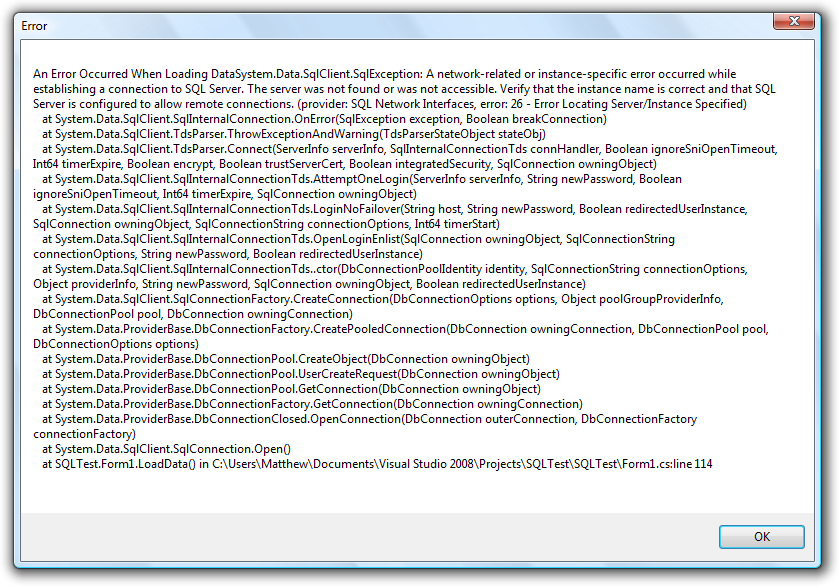
I started doing this and got a screen asking for the "Name", "Description", and "Server". The SQL Server on the Server wasn't an option, so does that mean I can't connect to SQL Server 2000? I DO connect to SQL Server 2000 with no problem when I use one of the programs in the office here. So, my computer can connect to SQL Server 2000 for that. I'm not sure what the problem would be for my database. I tried using the name "(local)" but it said that "(local) can not be used as a data source name." That's the exact error I got.quote:
Originally posted by LumbagoGood luck!- LumbagoMy blog-> http://thefirstsql.com/2011/07/08/how-to-find-gaps-in-identity-columns-at-the-speed-of-light/
Thanks. I'm really, REALLY confused at this point. It was going so well too. I don't understand why connecting is so troublesome. :( I'm coming from Access. If the file's there, you're connected. Easy breezy. It's rather frustrating trying to learn my way around SQL Server where the database can be there and you still just can't connect for some reason. :(I greatly appreciate your help though. |
|
|
|
M_Lyons10
Starting Member
11 Posts |
Posted - 2011-10-13 : 10:17:28
|
quote:
Originally posted by jassi.singh
Check whether you have entry in your host file.Please mark answer as accepted if it helped you.Thanks,Jassi Singh
Thanks, but I'm not sure what that means. Googling now... |
|
|
|
M_Lyons10
Starting Member
11 Posts |
Posted - 2011-10-13 : 10:33:18
|
| I'm actually wondering if that's why I can't connect. I went into Visual Studio to try to add another database connection and when I do that and I click the drop down for the Server Name the Server doesn't show up. It lists some other computers on the network, but not the Server where the SQL Server instance is running... Kind of strange. |
|
|
|
Lumbago
Norsk Yak Master
3271 Posts |
Posted - 2011-10-14 : 02:12:39
|
| Have a look at this tutorial -> http://www.devasp.com/samples/dsn_sql.aspIn the "select a driver", does "sql server" show up? If it does and you go to the name/description/server-prompts, what happens when you type "(local)" or the servername if you are on the server? If you get an error message, post THE EXACT message.- LumbagoMy blog-> http://thefirstsql.com/2011/07/08/how-to-find-gaps-in-identity-columns-at-the-speed-of-light/ |
|
|
|
M_Lyons10
Starting Member
11 Posts |
Posted - 2011-10-14 : 09:32:09
|
| I did have SQL Server show up when I did "Select a Driver" and I chose SQL Server Native Client. Today I went in and tried it again and tried SQL Server and again tried to name it (local). That did not work, with the exact error message I got being:"(local) can not be used as a data source name."I then tried naming it "Server" as the database isn't local and went to the Server drop down. The Server did not show up, though other computers on the network did. So I typed in "Server" figuring I would try that.That allowed me to continue. So now I went and there was a spot where you could select how you want to log in to the server. So I entered the user name and password and it let me continue past this step.That then took me to a place where I could change the default database. I'm hoping this won't mess up the program that already uses SQL Server, but I went in there and all of the SQL Server databases on the server were showing up and I chose mine.I then went through a couple of screens that were not in your linked tutorial with settings and such and changed nothing.I then went and ran my program and it still failed to connect to the database...So I created a simple test application that will allow me to populate a dataGridView based on a simple "SELECT * FROM Table" select statement and attempted to just execute that. That fails. It doesn't populate anything.I want to mention though that another program is already able to use SQL Server on our network. The same SQL Server and on the same Server and workstations. So, I just wanted to make that clear because the connection seems to be there, my program just can't use it for some reason... Actually, I wanted to clarify too. Should I be trying to create the (local) SQL Server connection on my workstation or on the server? I tried on both and got the same error "(local) can not be used as a data source name."... I was able to create one on my workstation that I called Server (Mentioned above).Here is the application I made to try to connect to the database. It uses the same method I'm trying to use in my application. It's called SQLTest1.zip http://tinyurl.com/3f6qvx6Thanks again. I also wanted to ask about the program that already uses SQL Server. I can't mess that program up somehow by doing this troubleshooting, can I?Thanks. :) |
|
|
|
M_Lyons10
Starting Member
11 Posts |
|
|
Lumbago
Norsk Yak Master
3271 Posts |
Posted - 2011-10-18 : 03:11:51
|
| Is it possible for you to move your application to another machine on the network and try the connection from there? Also, when you went through the ODBC-wizard, at the very end before you save it it says "Test your connection"...did you try this? Did it say "Test completed successfully"? From the error message you posted I'd say that there is something wrong with the driver you are using, but it's hard to say. Have you tried connecting with the IP address of the server? If none of this is working I'm starting to run out of ideas here to be honest...you don't have anyone around that can help you with this?- LumbagoMy blog-> http://thefirstsql.com/2011/07/08/how-to-find-gaps-in-identity-columns-at-the-speed-of-light/ |
|
|
|
M_Lyons10
Starting Member
11 Posts |
Posted - 2011-10-19 : 11:13:32
|
| Thanks so much for your help. I don't know what I would do honestly without it. I'm completely lost here and do not understand why I can't get this working. :(I tried moving it to another computer on the network and didn't have any luck connecting. I even installed it on the server and couldn't get it to connect. This just makes absolutely no sense to me. I don't know what to do at this point.I tried using the ip address of the server like so:Server=192.168.1.16;Database=Project.mdf;User ID=sa;Password=password;Trusted_Connection=False;Network Library=DBMSSOCN;But that didn't work either. Someone suggested I try using Network Library.When I run SQL Server Management Studio on my workstation, I am able to at the login screen, select "SERVER" and then enter the same user name and password as in the connection string I'm using and then it connects and the database is in there. I don't understand how it would be different connecting with my program.If there was a problem with the SQL Server driver I'm using, would the other programs that use the same SQL Server instance be able to connect? Because that's what I'm experiencing. The other programs work, just not mine.I don't know any SQL Server people to ask other than on forums. I'm really sorry, I was hoping it was something stupid that I was doing and that I could have it working by now. But I really need this working. I just don't know what to do at this point. It shouldn't be this hard to connect to my database.And yes, when I went through the ODBC settings for the SQL Server connection I created I got the following message:Microsoft SQL Server ODBC Driver Version 06.00.6002Running connectivity tests...Attempting connectionConnection establishedVerifying option settingsDisconnecting from serverTESTS COMPLETED SUCCESSFULLY!So, I appear to be able to connect there as well without any problem, and my settings were again the same ones I'm using in SQL Server Management Studio and the connection string.I just do not understand this. I really appreciate your help though. I haven't been able to find much help for this problem and am completely out of ideas. :( |
|
|
|
M_Lyons10
Starting Member
11 Posts |
Posted - 2011-10-19 : 11:31:25
|
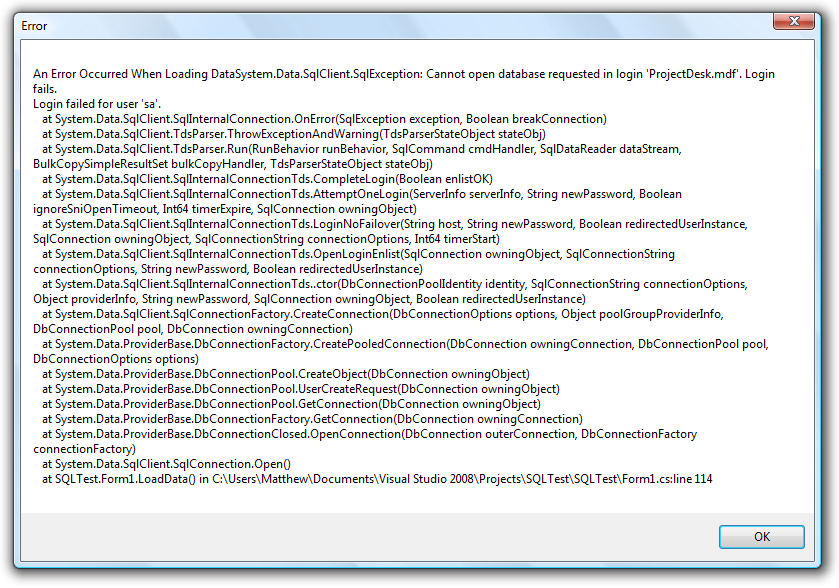
| I just wanted to post back. I got a new error this time using this connection string.Server=192.168.1.16;Database=ProjectDesk.mdf;User ID=sa;Password=password;Trusted_Connection=False;Network Library=DBMSSOCN;I am also getting the same error now if I use "SERVER".Server=SERVER;Database=ProjectDesk.mdf;User ID=sa;Password=password;Trusted_Connection=False;Network Library=DBMSSOCN;http://i133.photobucket.com/albums/q59/M_Lyons10/SQLTestvshostError76.pngSo, this sounds like for some reason the connection to the database is being denied? But I'm connecting to SQL? Or no? I might be premature in saying this, but it sounds promising? :) |
|
|
|
M_Lyons10
Starting Member
11 Posts |
Posted - 2011-10-19 : 11:42:31
|
| I tried creating a new "Login" under the SERVER Security as well and marking my database as the default database and setting up the login for the database and everything and using that. That gave me the same error as above. So it's basically telling me that my user name and password are wrong even though they are not... ? :( |
|
|
|
Lumbago
Norsk Yak Master
3271 Posts |
Posted - 2011-10-19 : 12:30:07
|
| There is one thing that stands out pretty clearly in your connection string and that is the database name. You are only supposed to have the database name in itself there and not the filename. So try to remove the ".mdf" and change the name to whatever the actual database name is when you look at it in management studio. And use the ip alao, not the server name (it's safer that way, once you got it working you can start to change things).- LumbagoMy blog-> http://thefirstsql.com/2011/07/08/how-to-find-gaps-in-identity-columns-at-the-speed-of-light/ |
|
|
|
M_Lyons10
Starting Member
11 Posts |
Posted - 2011-10-20 : 12:45:05
|
| Wow. That was it. It's working now. I'm really sorry for making such a stupid mistake. I can't even believe that would cause such a problem. I even installed the application on another computer and it worked without any problem! I'm so unbelievably excited. I really appreciate your help. I don't know how to even thank you enough... :)Thanks again for all of your help. You're really awesome. :) |
|
|
|
Lumbago
Norsk Yak Master
3271 Posts |
Posted - 2011-10-21 : 02:16:42
|
That's fantastic! Over a weeks worth of effort (hopefully not continuously  ) and it comes down to 4 small characters. To be honest I was about to give up on you if this didn't work...I think I would have had to see what you were actually doing to make any further progress. Good stuff!- LumbagoMy blog-> http://thefirstsql.com/2011/07/08/how-to-find-gaps-in-identity-columns-at-the-speed-of-light/ ) and it comes down to 4 small characters. To be honest I was about to give up on you if this didn't work...I think I would have had to see what you were actually doing to make any further progress. Good stuff!- LumbagoMy blog-> http://thefirstsql.com/2011/07/08/how-to-find-gaps-in-identity-columns-at-the-speed-of-light/ |
|
|
|
garvit184
Starting Member
1 Post |
Posted - 2011-11-04 : 13:36:43
|
| When I try connecting to a server in SQL Server Management Studio Express 2005 with Server Name as PC-Name\MSSMLBIZ\SQLEXPRESS or ./SQLEXPRESS and Windows Authentication it shows that required instance is not found and I opened my SQL Server Configuration Manager It had just two instance or name (MSSMLBIZ and SQL Server Browser) and it had no SQLEXPRESS which may the problem why I was not able connect. How do I get my SQLEXPRESS running I want to compile my queries?? HELP !!Garvit |
|
|
|
|



 Connecting to SQL Server on another machine