Please start any new threads on our new
site at https://forums.sqlteam.com. We've got lots of great SQL Server
experts to answer whatever question you can come up with.
| Author |
Topic |
|
a_k_wong
Starting Member
3 Posts |
 Posted - 2011-01-04 : 20:38:28 Posted - 2011-01-04 : 20:38:28
|
| I have deployed a report from the Visual Studio. However after I 'renamed' the report or 'deleted' it from the Solution Explorer, the previously named or deleted report still appears in the SSRS report manager. Is there anyway to get rid of the previously named or deleted report? or is removing ALL users (including the administrator) from the Security tab under Properties in SSRS the only way to do so? |
|
|
MageshkumarM
Yak Posting Veteran
61 Posts |
Posted - 2011-01-05 : 05:51:35
|
| did you talking about Visual studio right,MAG,Start with the new Idea..:) |
 |
|
|
Lumbago
Norsk Yak Master
3271 Posts |
Posted - 2011-01-05 : 10:05:24
|
| You need to think of Visual Studio as you development environment and the report server as you production environment. Even if you rename/delete an object in your dev doesn't mean it gets renamed/deleted in prod. They are two different repositories. In other words: you will have to do the rename/delete twice, alternatively delete everything in prod and deploy the entire project again (NOT recommended)- LumbagoMy blog (yes, I have a blog now! just not that much content yet) -> www.thefirstsql.com |
|
|
|
a_k_wong
Starting Member
3 Posts |
Posted - 2011-01-05 : 16:34:15
|
| Thanks for your reply. How do I rename/delete a report in report manager? |
|
|
|
Lumbago
Norsk Yak Master
3271 Posts |
Posted - 2011-01-06 : 02:59:18
|
If you go in to the desired folder in report manager and click the link "show details" which is on the right side in the middle of the picture itwill give you some extra options that are not displayed by default. 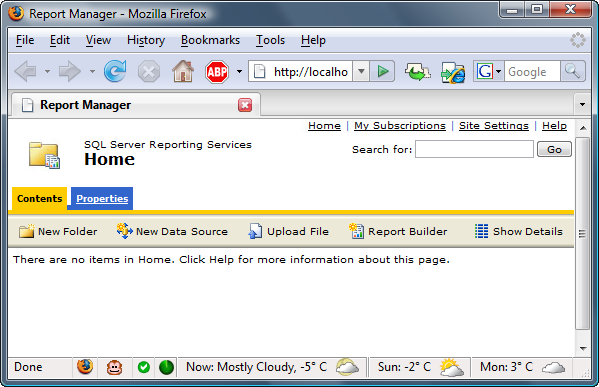 - LumbagoMy blog (yes, I have a blog now! just not that much content yet) -> www.thefirstsql.com - LumbagoMy blog (yes, I have a blog now! just not that much content yet) -> www.thefirstsql.com |
|
|
|
a_k_wong
Starting Member
3 Posts |
Posted - 2011-01-06 : 17:26:46
|
| Thanks very much. It worked. |
|
|
|
|
|
|



 Problems with deployment