| Author |
Topic |
|
mpooley
Starting Member
13 Posts |
 Posted - 2011-01-06 : 07:27:13 Posted - 2011-01-06 : 07:27:13
|
| HiI have a table called BoilerState which has a 5 columnsID,temperature,sensorID,readingdate and Boilerstatea new row is created every minute.I want to find the Total number of minutes that the boiler was on for each day. where the sensorID =8the boilerstate is 0 for off 1 for on.I have tried a few things but am stuckThis is the best i have done so far it returns columns but it is not what i wantedSELECT datepart(day,ReadingDate), SUM(BoilerState) AS TotalMins FROM BoilerState where RoomSensorID=8 group BY ReadingDateMichael D Pooley |
|
|
dataguru1971
Master Smack Fu Yak Hacker
1464 Posts |
|
|
mpooley
Starting Member
13 Posts |
Posted - 2011-01-06 : 07:40:55
|
| SorryI would expect a daily total of anywhere between 100 to 800 mins for the 3 months data that there is so far.I am getting two columns returnedone with no column name and the other as TotalMinsthe first column is random (day no's) between 1 and 31 in no order that i can see and 82792 results which is far more than the approx 90 days of datathe second column contains numbers between 0 and 31 seemingly at random alsothe only difference is the second column contains zeros (quite a lot)so in truth i dont understand the results i am gettingMikeMichael D Pooley |
 |
|
|
dataguru1971
Master Smack Fu Yak Hacker
1464 Posts |
Posted - 2011-01-06 : 07:50:50
|
Not sure if you want the random day #'s or Day Of Week, but you should be filtering ReadingDate for the range expectedSELECT DATENAME(WEEKDAY,ReadingDate) as DayofWeek, SUM(BoilerState) AS TotalMinsFROM BoilerStateWHERE ReadingDate >= '20100101' and ReadingDate <= '20101231' and RoomSensorID=8GROUP BY DATENAME(WEEKDAY,ReadingDate)
Poor planning on your part does not constitute an emergency on my part. |
|
|
|
mpooley
Starting Member
13 Posts |
Posted - 2011-01-06 : 08:01:18
|
| Thankyou! that is great.It returns 7 rows weds to teusday! with total minutes so I am nearly thereSorry if i didn't make it clear though.I wanted all approx 90 days totalswould that be possible?thanks for your help it is much appreciatedMikeMichael D Pooley |
|
|
|
dataguru1971
Master Smack Fu Yak Hacker
1464 Posts |
Posted - 2011-01-06 : 15:39:49
|
Can you clarify what you want as a result please?
Poor planning on your part does not constitute an emergency on my part. |
|
|
|
mpooley
Starting Member
13 Posts |
Posted - 2011-01-06 : 19:39:30
|
| I want a table with 2 columns1st col = date2nd col = total minutes (eg number of records where the boilerstate=1 for that date)thanks for you patiencemikeMichael D Pooley |
|
|
|
dataguru1971
Master Smack Fu Yak Hacker
1464 Posts |
Posted - 2011-01-06 : 20:07:38
|
SELECT D ReadingDate , SUM(BoilerState) AS TotalMinsFROM BoilerStateWHERE ReadingDate >= '20100101' and ReadingDate <= '20101231' and RoomSensorID=8GROUP BY ReadingDateORDER BY ReadingDateJust select the date column instead of the weekday like my other one.
Poor planning on your part does not constitute an emergency on my part. |
|
|
|
mpooley
Starting Member
13 Posts |
Posted - 2011-01-07 : 08:01:11
|
Sorry no that isn't working either - I had to delete the D before reading date as is gave me an error 'invalid column name D'when i removed the D and ran iti got two columns like i wanted but the dates weren't just one per day IYSWIM they were every minute of the day, so instead of collating all these readings into 1 per day they were still in the original format of 1 per minute.if i could post a screen shot that might help but i dont know how i'll try this and see if it works: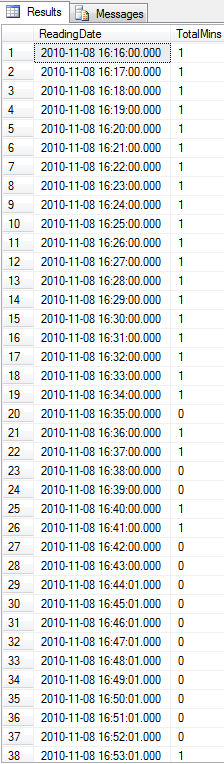 i do appreciate your time and don't expect you to waste too much time on my problem, i honestly thought this one would be easy ! that just shows my ignorance lolMichael D Pooley i do appreciate your time and don't expect you to waste too much time on my problem, i honestly thought this one would be easy ! that just shows my ignorance lolMichael D Pooley |
|
|
|
dataguru1971
Master Smack Fu Yak Hacker
1464 Posts |
Posted - 2011-01-07 : 08:03:48
|
Ahh.. I see. Here you go, (Sorry about the rogue letter up there)Strip the time off the date, then you will get the daily aggregates. SELECT DATEADD(D,0,datediff(d,0,ReadingDate)) as DateOnly , SUM(BoilerState) AS TotalMinsFROM BoilerStateWHERE ReadingDate >= '20100101' and ReadingDate <= '20101231' and RoomSensorID=8GROUP BY DATEADD(D,0,datediff(d,0,ReadingDate))ORDER BY DATEADD(D,0,datediff(d,0,ReadingDate))Alternately you could use convert SELECT CONVERT(varchar(10),ReadingDate,101) as DateOnly , SUM(BoilerState) AS TotalMinsFROM BoilerStateWHERE ReadingDate >= '20100101' and ReadingDate <= '20101231' and RoomSensorID=8GROUP BY CONVERT(varchar(10),ReadingDate,101)ORDER BY CONVERT(varchar(10),ReadingDate,101)But you may see odd results sorting by the result varchar in that one.
Poor planning on your part does not constitute an emergency on my part. |
|
|
|
mpooley
Starting Member
13 Posts |
Posted - 2011-01-07 : 08:17:15
|
| Thats great!Much appreciated :)Michael D Pooley |
|
|
|
|



 adding up a total per day